ANDROID ↔ MACBOOK · WINDOWS · LINUX

Your devices.
Working as one.

AirBridge is a source-available AirDrop alternative for Android and computers. Send multi-gigabyte files, copy photos and text between clipboards, answer phone calls on your MacBook with two-way audio, keep your contacts synced, and watch your phone screen at 30fps H.264. Content is end-to-end encrypted. No account or cloud storage.

SPAKE2 + AES-256-GCM H.264 Screen Video Calls & Contacts Continuity

iPhone and iPad work through Safari for file transfer and clipboard sharing, subject to browser permissions. There is no native iOS app; screen sharing, contacts and calls are not promised on iOS. Open the address shown by your running AirBridge computer. Its local HTTPS certificate may trigger a CA trust warning: only continue after checking that the address belongs to your own instance.

The Android app is planned for Google Play as a paid distribution; no Play listing is available yet. The Android APK on GitHub Releases and every desktop release stay free.

Source available · by Diganta DeyNo account neededAndroid, macOS, Windows & Linux

SPAKE2 + AES-GCMRFC 9382 zero-knowledge code proof paired with per-frame AES-256-GCM encryption.
Multi-GB SafeDirect-to-disk `.part` journals, TCP backpressure, and identity-proven reconnect resume.
30fps H.264ISO `avcC` WebCodecs playback with automatic PLI keyframe recovery for video streaming.
Zero CloudNo account or cloud storage. Diagnostics stay on your device unless you choose to share them.

Ecosystem continuity,
without the walled garden.

Android and Mac users shouldn’t have to email files to themselves, fight broken web-only AirDrop clones, or settle for choppy screenshots instead of real video screen sharing.

AirBridge brings multi-gigabyte resilient file transfers, photo and text Universal Clipboard, saved contacts, MacBook call audio controls, and live H.264 screen mirroring together in native Android and desktop apps that stay honest about privacy and platform boundaries.

Explore every capability

Everything that moves
between phone & Mac.

Engineered end to end across Kotlin, Swift, TypeScript, WebCodecs, and Web Audio — built to survive real-world networks.

01 / RESILIENT FILE TRANSFERS

Long files finish.
Every single time.

Stream multi-gigabyte videos and up to 100 mixed files straight to disk via `.part` append-only journals. Backpressure pacing, 3-strike heartbeat tolerance, transient daemon retries, and verified-identity resume prevent mid-transfer or near-completion drops — verified by SHA-256 before saving.

02 / PHOTO & TEXT CLIPBOARD

Copy photos on Mac.
Paste crisp images on Android.

macOS inspects native NSPasteboard image and text types directly, capturing copied screenshots and photos cleanly without corrupted binary gibberish. SHA-256 echo suppression blocks loops while Android honors system Share, Process Text, Quick Settings, and Paste actions.

03 / SMOOTH H.264 SCREEN SHARING

Real video fluidity
on your MacBook.

Hardware Android MediaCodec encoding caches SPS/PPS headers onto every keyframe, pairs with ISO 14496-15 avcC WebCodecs decoding on MacBook, paces canvas draws via requestAnimationFrame, and requests instant PLI keyframes after packet loss. Always consent-prompted with optional per-session playback audio; DRM-protected apps remain blank by design.

04 / PERSISTENT CONTACTS & CALL AUDIO

Contacts stay saved.
Talk from your MacBook.

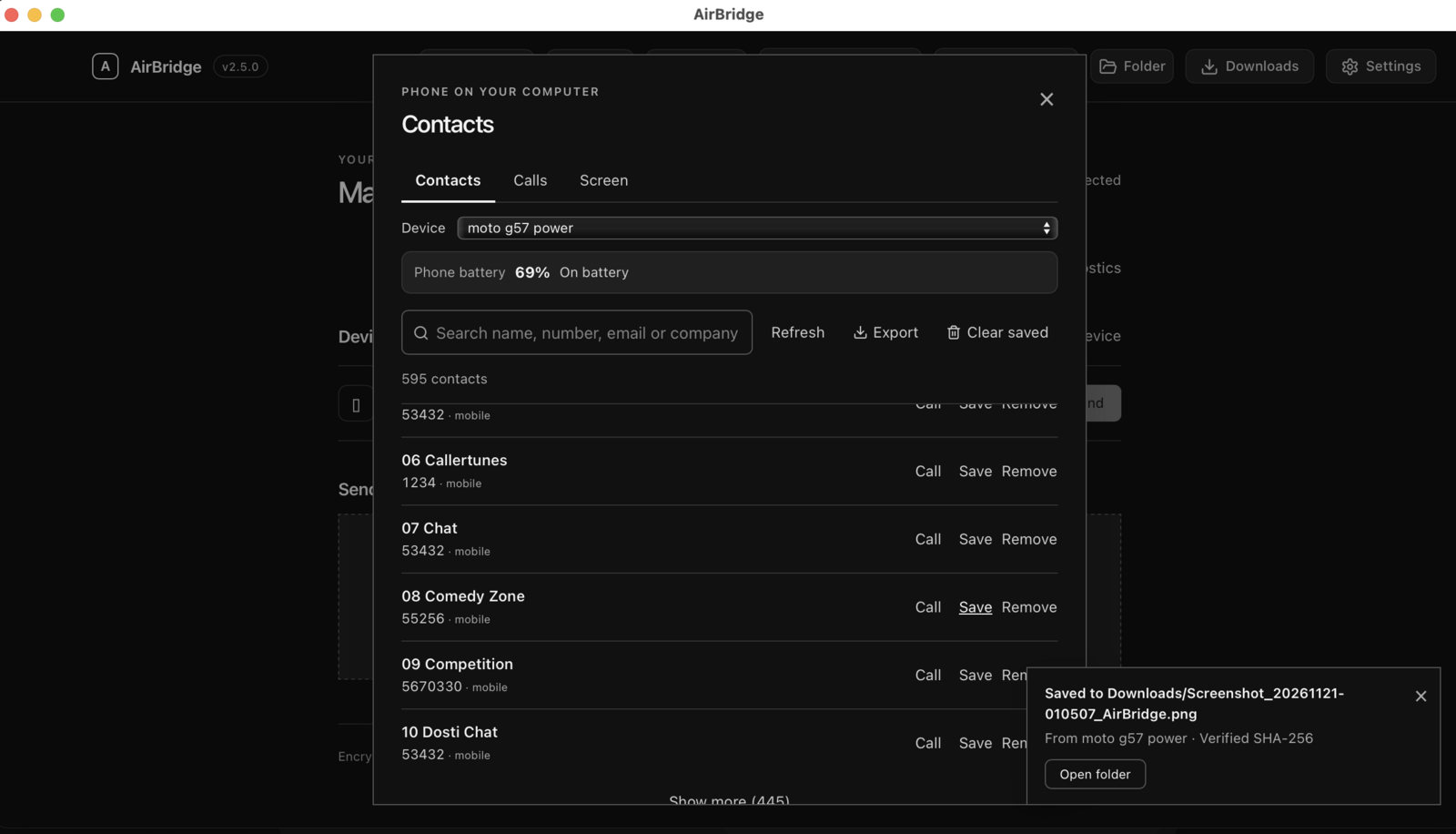
Synced phone contacts persist across modal closes and app reloads until you remove them or the device disconnects. Place or answer calls from your desktop and opt into Use Mac Audio for encrypted two-way 16 kHz call audio (speakerphone-assisted bridge with Android AEC/NS).

05 / PAIRING ANYWHERE

Direct LAN, BLE Hotspot, or E2EE Relay.

Pair by QR scan or 6-character code via SPAKE2 (RFC 9382), hand over a phone hotspot over Bluetooth LE when offline, or cross restricted networks through an optional self-hostable E2EE relay.

06 / VERIFIED SECURITY

Compare codes.
Trust pinned keys.

Compare 6-digit SAS verification fingerprints and pinned TLS CA digests. Trusted identities persist securely without trusting forged ephemeral sessions.

07 / DIAGNOSTICS & UPDATES

Transparent health.
Automatic recovery.

One-click scrubbed diagnostics cover transfer retries, H.264 decode mode, clipboard counts, and call audio frames—with tokens and keys redacted—plus checksum-verified staged desktop updates.

ALSO INCLUDED

Dark & light themes · Custom receive folder · Finder reveal · Phone battery pill · PWA Share Target · CLI daemon · Redacted crash reports · macOS menu-bar Phone controls · Linux desktop actions

Explore full technical specifications
Transfer pipeline & integrity

Windowed binary SACK streaming (16 KiB–1 MiB chunks), per-chunk AES-256-GCM AEAD, TCP relay pause/drain backpressure below the 64 MiB cap, 3-strike heartbeat stall checks, incremental SHA-256 + final verification before saving, and loopback daemon retry/resume.

Continuity & native permissions

Contacts persistence tied to connected peer identity + user removal, two-way call audio (`FRAME_CALL_AUDIO` with anti-replay counters), H.264 Annex-B to `avcC` transcoding, and native macOS `NSPasteboard` photo capture. Every phone permission is explicit and optional; zero Accessibility Services.

Cross-platform runtime & CLI

Native Jetpack Compose Android app, ad-hoc signed macOS `AirBridge.app` menu-bar Swift shell, Windows & Linux standalone executables, and a CLI you can run from a source checkout with `npm run cli`. One-shot CLI links have different threat properties than E2EE peer transfers; see the README.

Actual AirBridge,
mid-transfer.

These are real screenshots of AirBridge on a Mac and an Android phone — no mockups and no invented features.

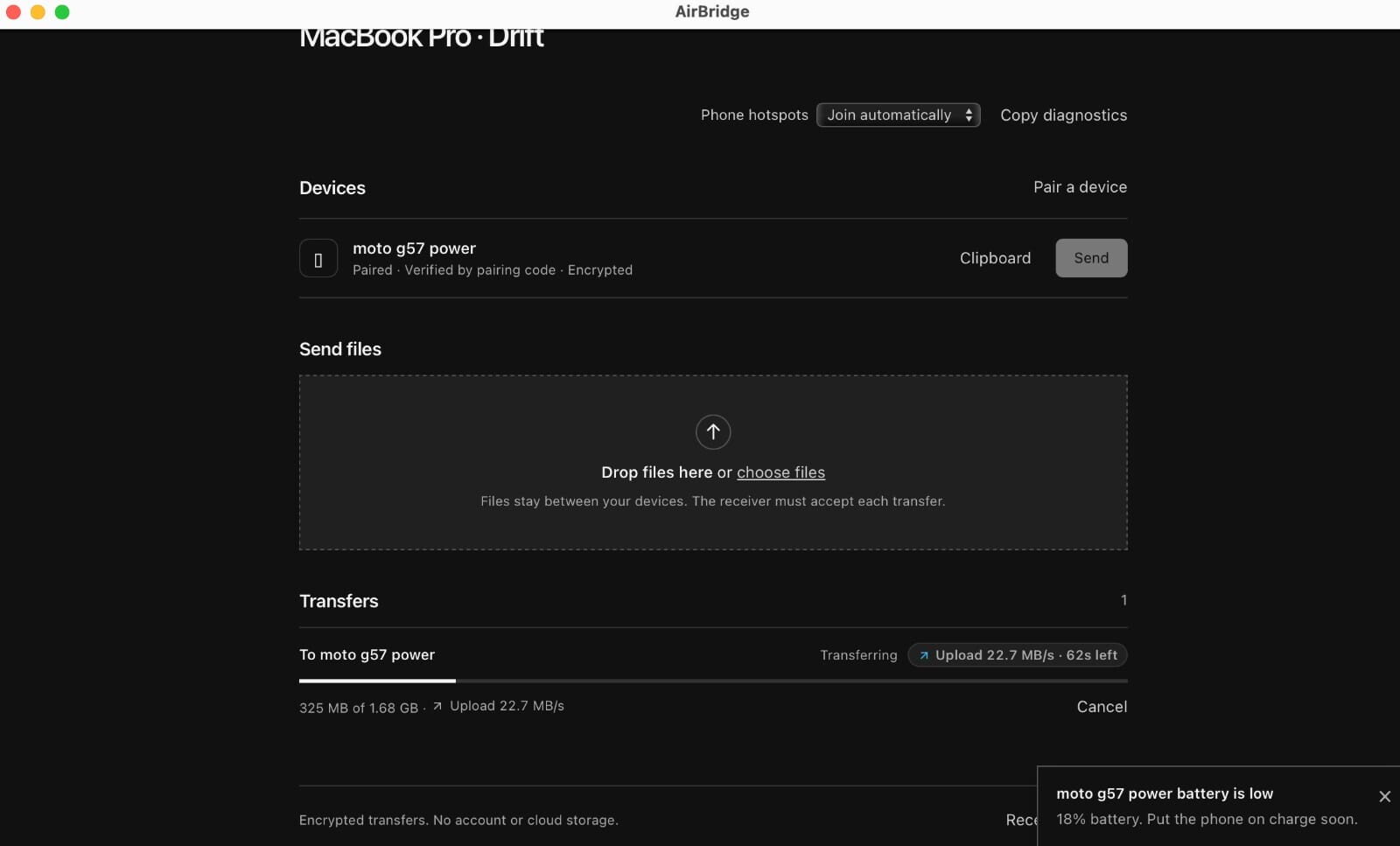
AirBridge on macOS sending a 1.68 GB video to a paired Android phone at 22.7 MB/s with 62 seconds remaining
File transfer in progressmacOS sending a 1.68 GB video: live speed, remaining time and cancel, with SHA-256 verification before the file is saved.
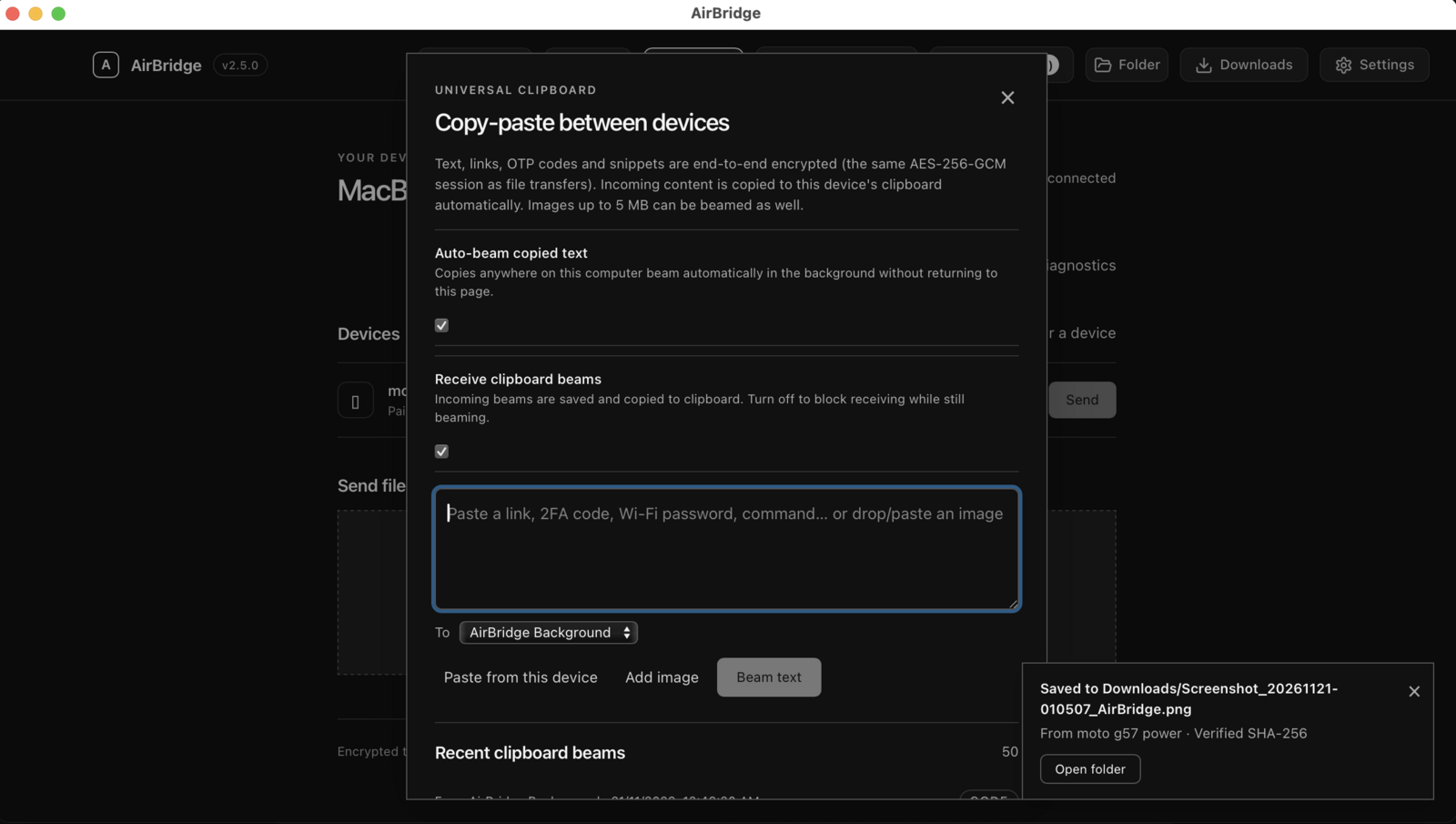
AirBridge clipboard panel with auto-beam options, a paste box for links and 2FA codes, and a list of recent clipboard beams
Clipboard beamsText, links and 2FA codes to the paired device, encrypted with the same session keys as file transfers. Photos beam as well on macOS.
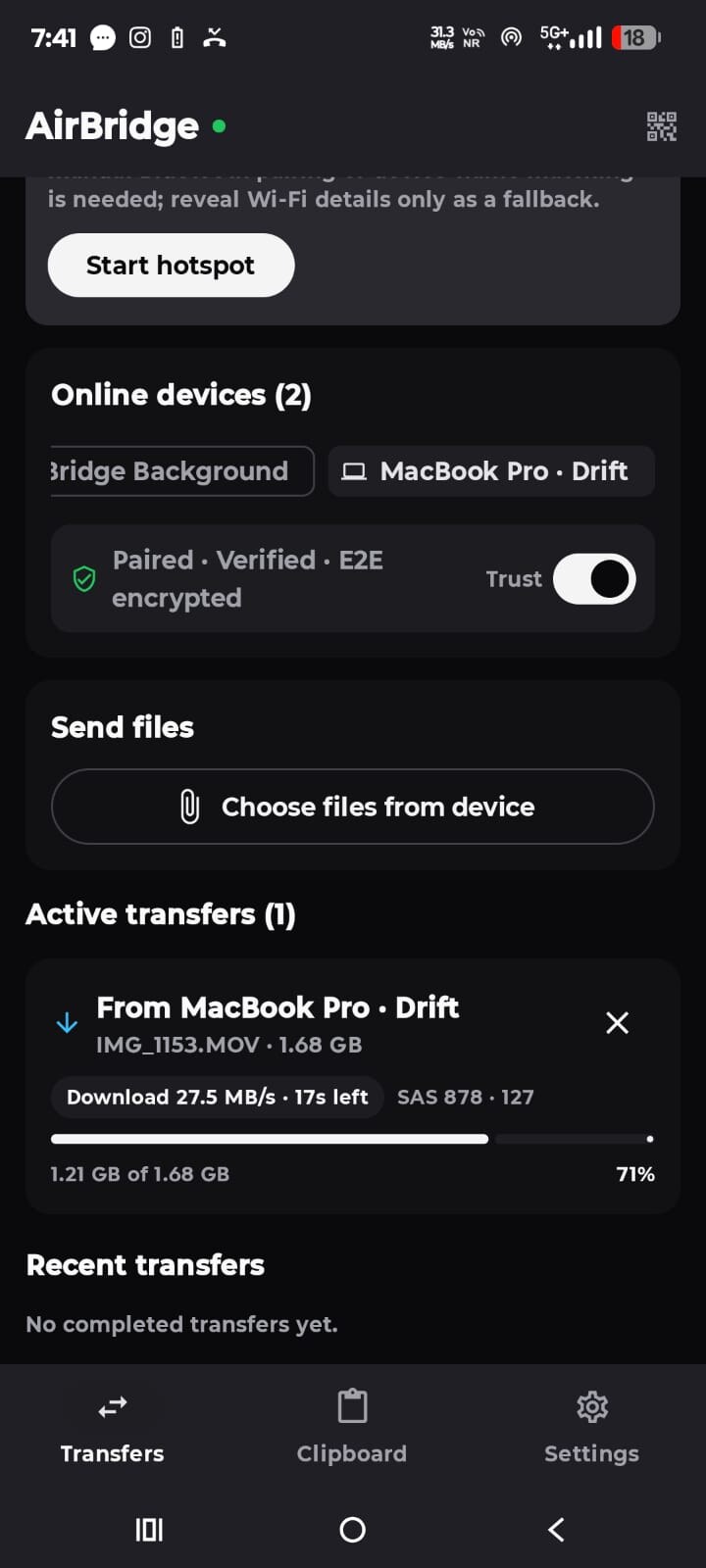
AirBridge on Android receiving a 1.68 GB file at 27.5 MB/s with a progress bar and verified peer fingerprint
The phone side1.68 GB arriving at 27.5 MB/s, with the verified peer fingerprint under the progress bar.
AirBridge Calls panel with device selector, phone battery level, numeric keypad and Call from phone button
Calls & batteryDial from the computer, watch the phone’s battery, and opt into Mac call audio per call.

Browse all guides

Built for mixed
Android + Desktop workflows.

Side-by-side comparison with existing ecosystem and third-party sharing tools.

Capability AirBridge v2.5.6 Apple AirDrop / Continuity LocalSend KDE Connect
Platforms Android ↔ macOS, Windows, Linux + CLI Apple devices only Cross-platform UI apps Linux strong; macOS unofficial
End-to-End Encryption SPAKE2 + ECDH P-256 + AES-256-GCM + SAS Proprietary Apple TLS transport TLS transport
Photo & Text Clipboard Bidirectional text + macOS photo sync (no binary gibberish) Apple-only Universal Clipboard Manual text/file sends Text sync; no macOS native photo capture
Multi-GB Resume Integrity Direct-to-disk `.part` journal + pre-save SHA-256 Proprietary Restart required on drop Restart required on drop
Screen Sharing Consent-based H.264 (`avcC`) video + PLI recovery iPhone Mirroring (Apple-only) Not supported Not built-in
Contacts & Call Audio Bridge Saved contacts + dial/answer + optional E2EE Mac audio + home battery badge Apple Continuity only Not supported Call alerts; no duplex web call audio
Notifications & Inline Reply Opt-in native desktop banners with app icons + inline reply + sync dismissal iPhone Mirroring / Continuity Not supported KDE Plasma notifications

Set it up for
your devices.

Focused guides for each task: what AirBridge actually does on that platform, how pairing and encryption work, and where another tool may fit you better.

Zero accounts.
Encrypted locally.

AirBridge uses SPAKE2 (RFC 9382) to check that both devices know the pairing code without sending the code itself. ECDH P-256 and HKDF derive session keys. AES-256-GCM encrypts file chunks, clipboard items, call audio and screen frames. Received files are checked with SHA-256 before they appear in Downloads.

Platform limits: Screen sharing requires explicit approval per session and respects Android DRM (`FLAG_SECURE` content stays blank). Call audio routing uses an opt-in speakerphone-assisted bridge because standard unrooted Android blocks raw cellular uplink injection. Background clipboard never abuses Android Accessibility Services.

Read our privacy policy

Up and running
in two minutes.

Install the companion on macOS, Windows, or Linux, then pair the Android app by scanning the QR code or entering the 6-character code. Building from source requires Node.js 20+, npm, and Git.

All platform downloads & checksums
Browse source on GitHub
01

Install on macOS, Linux, or Windows

macOS & Linux (installs ~/Applications/AirBridge.app or XDG launcher without sudo):

curl -fsSL https://raw.githubusercontent.com/DigantaDey/AirBridge/main/install.sh | bash

Windows PowerShell:

powershell -ExecutionPolicy Bypass -Command "iwr https://raw.githubusercontent.com/DigantaDey/AirBridge/main/install.ps1 -UseBasicParsing | iex"

Prefer running from source? Clone and start locally on port 3000:

git clone https://github.com/DigantaDey/AirBridge.git
cd AirBridge && npm ci && npm run dev
02

Install AirBridge on Android

Open the native Jetpack Compose Android app and scan the QR code displayed on your computer (or pick your Mac from nearby LAN discovery). Every continuity permission — Contacts, Phone Calls, Call Microphone, Screen Capture — stays off until you explicitly toggle that feature on.

03

Verify once & share across everything

Compare the 6-digit verification code (and CA fingerprint if pairing in a mobile browser over HTTPS), then send multi-GB files, copy photos cleanly between clipboards, manage saved contacts, talk on calls from your MacBook, or stream your Android screen smoothly at 30fps.

Details that
actually matter.

Clear answers on continuity features, OS constraints, encryption, and troubleshooting.

Ask a question
How smooth is screen sharing from Android to MacBook?

Android encodes screen frames via hardware MediaCodec H.264 with cached SPS/PPS codec headers and zero B-frames, while the MacBook client configures ISO 14496-15 avcC WebCodecs decoding, renders synced frames via requestAnimationFrame, and requests instant PLI keyframes if a delta drops. Optional per-session playback audio stays off by default, and DRM-protected apps remain blank by design.

How does MacBook phone-call audio & persistent contacts work?

Once you grant Contacts and Phone permissions, contacts synced to your computer stay saved locally until you delete them or disconnect the device. During a call, tapping Use Mac Audio activates an end-to-end encrypted 16 kHz PCM audio bridge between macOS and Android (speakerphone-assisted with Android echo cancellation because unrooted Android restricts raw cellular uplink audio injection).

Will copying a photo on MacBook send gibberish text to Android?

No — since v2.5.0 macOS inspects native NSPasteboard image types first instead of piping raw binary pasteboard data through text capture. Copied PNG/TIFF/JPEG images arrive as crisp clipboard images on Android with SHA-256 echo suppression.

Why don’t long file transfers drop mid-stream or near completion anymore?

Since v2.5.0, the server relay uses 3-strike heartbeats that count active TCP bytesWritten progress, throttles saturated sockets before reaching the 64 MiB safety cap, disables short HTTP request timeouts on chunk uploads, retries transient loopback writes, keeps resume identity matched across ephemeral session key refreshes, and re-sends final completion ACKs automatically.

Can I cast Netflix, Hotstar, or DRM-protected streams?

No. AirBridge is a consent-based productivity & continuity screen mirror and never bypasses DRM or system flags such as FLAG_SECURE.

Does AirBridge use Accessibility or mirror notifications?

AirBridge never declares an Android Accessibility Service. Phone notification mirroring and inline message replies are strictly opt-in behind an explicit Settings switch, prominent disclosure dialog, and Android Notification Access — excluding ongoing, system, call, and secret alerts. For clipboard sends outside AirBridge, use Share → AirBridge, Process Text → AirBridge, the Quick Settings tile, or Paste.

Why do mobile browsers ask for a local certificate, and does the Android app need it?

Mobile browsers require HTTPS for Web Crypto APIs. AirBridge’s built-in local CA uses a fingerprint shown in the Pairing panel and terminal; meanwhile the native Android app pins your paired desktop’s public key directly, so it connects securely without manual OS certificate installs. See the certificate guide for full details.

Does AirBridge use Apple AirDrop?

No. AirBridge is an independent, source-available project and does not implement proprietary Apple protocols. AirDrop and Continuity are Apple trademarks; AirBridge is not affiliated with Apple or Google.
Built by
Diganta Dey.

Designed to make everyday work across Android, macOS, Windows, and Linux fast, private, and frustration-free — with clean local diagnostics, honest permissions, and zero cloud lock-in.

AirBridge v2.5.6 · Local-First Continuity

The source is public at DigantaDey/AirBridge under the Fair-Use & Non-Commercial License, not an OSI-approved open-source licence. Personal, non-commercial use is free. Commercial or organisational use requires prior written consent. See LICENSE.